What Happened
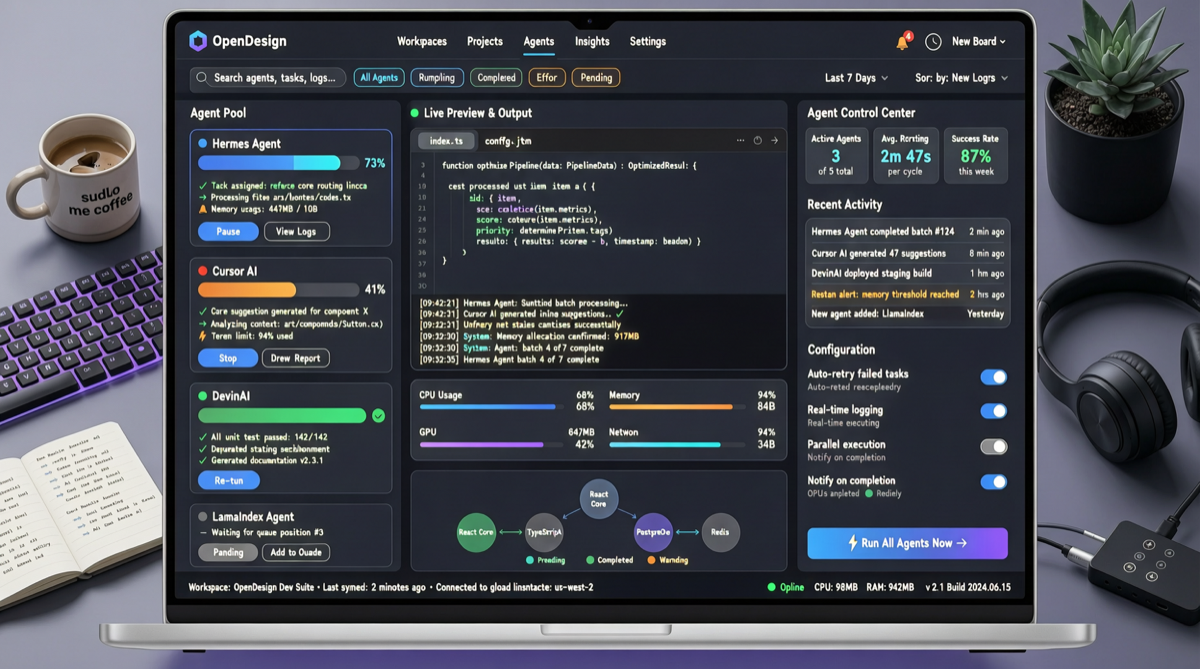
Open Design — previously the open-source alternative to Claude Design — officially released Kanban Mode in early May, with core updates including:
- Unified Multi-Agent Orchestration: Manage Hermes Agent, Cursor, DevinAI and other AI development tools simultaneously in one interface
- Real-Time Status Preview: Visually monitor each Agent’s running progress, output, and status
- Parallel Prototype Design: Run multiple design tasks simultaneously without interference
- 19 Built-in Skills: Covering UI design, code generation, documentation writing and other scenarios
- Multi-Tool Compatibility: Supporting Claude Code, Codex, Cursor, Gemini CLI and other AI tools
This update triggered strong response in the Chinese developer community, with “this update really pulls AI development experience to a new height” becoming a frequent evaluation.
Why It Matters
From Single-Tool Calling to Multi-Agent Collaboration
AI development tools have evolved rapidly over the past year, but have always faced one pain point: each tool is an island.
Previous workflow:
Claude Code → Terminal window A
Cursor → VS Code window
DevinAI → Browser tab C
Hermes Agent → Terminal window D

Problem: Switching back and forth, states not shared, cannot run in parallel
Open Design Kanban Mode unifies all of this into one interface:
Open Design Kanban:
┌─────────────────────────────────────────────────────┐
│  TODO → In Progress → Completed                      │
│                                                     │
│  [Card] Frontend  [Card] API Dev    [Card] Docs      │
│   ├─ Cursor        ├─ DevinAI       ├─ Hermes Agent  │
│   ├─ Running 78%   ├─ Running 45%   ├─ Completed ✓   │
│   └─ Live preview  └─ Live preview  └─ View output   │
│                                                     │
│  [+ Add task]  [🔄 Refresh]  [⚙️ Tool config]        │
└─────────────────────────────────────────────────────┘
Technical Architecture Analysis
Open Design’s 19 built-in skills are uniformly packaged as callable “skill modules” through CLI interfaces:
| Skill Category | Example Skills | Applicable Tools |
|---|---|---|
| UI Design | Component generation, color schemes, layout optimization | Claude Code, Cursor |
| Code Generation | API scaffolding, CRUD templates, test cases | DevinAI, Hermes Agent |
| Documentation | API docs, README, architecture descriptions | All tools |
| Code Review | Security checks, performance analysis, dependency audit | Claude Code, Cursor |
| Deployment | Docker configuration, CI/CD pipelines | Hermes Agent |
This “skills as modules” architecture makes Open Design an orchestration layer for AI tools, not a replacement layer — it doesn’t replace any existing tool, but makes them work together.
Competitor Comparison
| Project | Positioning | Multi-Agent Orchestration | Visualization | Open Source |
|---|---|---|---|---|
| Open Design | AI design tool orchestration layer | ✅ Kanban mode | ✅ Real-time preview | ✅ |
| Ruflo | Claude Agent orchestration platform | ✅ Neural system integration | Partial | ✅ |
| Beads | Multi-Agent task tracking | ✅ Task dependency graph | Partial | ✅ |
| The Agency | 147 professional AI Agents | Virtual company mode | ❌ | ✅ |
| Sim | AI Agent one-person company | ✅ Workflow orchestration | ✅ | ✅ |
Open Design’s unique advantage: It doesn’t build an Agent framework from scratch, but provides an orchestration layer on top of existing AI tools. This means users can continue using their familiar tools, just gaining a unified management interface.
How to Use It
Scenario 1: Product Design Sprint
Kanban column setup:
┌────────┬────────────┬──────────┬──────────┐
│ TODO   │ Designing   │ Developing│ Completed│
├────────┼────────────┼──────────┼──────────┤
│        │ Homepage    │ Login pg  │ Nav comp │
│        │ (Claude)   │ (Cursor) │ (Devin)  │
│ Profile│ Color scheme│ API       │ Docs     │
│        │ (Claude)   │ (Hermes) │ (Claude) │
└────────┴────────────┴──────────┴──────────┘
Scenario 2: Full-Stack Project Parallel Development
- Frontend Agent (Cursor): Responsible for UI components and page building
- Backend Agent (DevinAI): Responsible for API and database logic
- Documentation Agent (Hermes Agent): Synchronously writes technical docs
- Three Agents run in parallel on the Kanban board, progress visible at a glance
Scenario 3: Design Prototype Iteration
- Create multiple prototype tasks on the Kanban board
- Assign different AI tools to each task
- Real-time preview of each prototype’s output
- Compare and select the optimal solution
Landscape Assessment
The open-sourcing of Open Design Kanban Mode signals a trend: In 2026, the competition in AI development tools is shifting from “individual tool capability” to “tool ecosystem orchestration capability”.
Whoever can make multiple AI tools work together will gain a decisive advantage in developer experience. Open Design’s open-source approach is expected to quickly establish ecosystem standards.
Action Recommendations:
- Developers using multiple AI tools: Open Design Kanban Mode is worth trying
- Team Leads: Can serve as a unified management platform for multi-agent collaboration
- Open-source contributors: The 19 skills have large expansion space, welcome new skill contributions