Bottom Line First
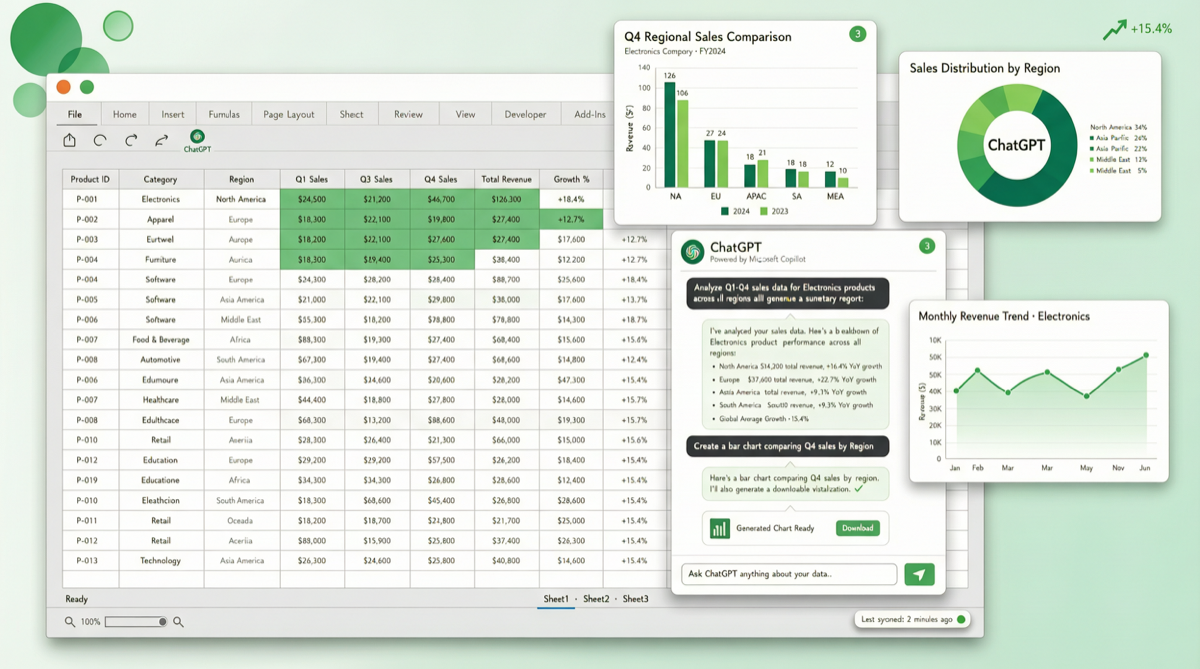
OpenAI has stuffed GPT-5.5 directly into Excel and Google Sheets. This is not "yet another AI plugin" — it is the first solution to deeply embed frontier-level reasoning capabilities into spreadsheets. For anyone who works with data daily, this means time-consuming operations like data cleaning, formula writing, and trend analysis have gone from "manual plus documentation lookup" to "just say the words."
What Happened
Core features:
- ChatGPT launches as a direct add-on for Microsoft Excel and Google Sheets
- Powered by the newly released GPT-5.5, delivering frontier-level reasoning
- Supports in-sheet conversation without switching to a browser
Typical use cases:
- Data cleaning: Tell ChatGPT "unify the date format in this column to YYYY-MM-DD, remove empty rows"
- Formula generation: Describe your calculation logic, ChatGPT writes the correct formula directly
- Trend analysis: Select a data range, ask ChatGPT to "analyze the quarterly trends in this sales data and flag anomalies"
- Visualization suggestions: Based on data characteristics, recommends appropriate chart types and generates them automatically
Tool Stack Comparison
| Solution | Capability | Cost | Best For |
|---|---|---|---|
| ChatGPT Excel/Sheets add-on | GPT-5.5 reasoning, native integration | ChatGPT subscription | Daily office work, lightweight data analysis |
| Python + pandas + LLM API | Full-featured, programmable | API costs + dev time | Complex data processing, automated pipelines |
| Excel built-in AI (Copilot) | Basic AI, Microsoft ecosystem | Microsoft 365 subscription | Enterprise users already in Microsoft ecosystem |
| Google Sheets built-in AI | Basic AI, Google ecosystem | Google Workspace subscription | Teams already in Google ecosystem |
Getting Started
- Install: Search for "ChatGPT" in the Excel or Google Sheets add-on marketplace, click install
- Login: Sign in with your ChatGPT account (requires Plus/Team/Enterprise subscription)
- Use:
- Excel: Open the ChatGPT panel in the sidebar, select cells and describe your needs
- Sheets: Find ChatGPT in the Extensions menu, open it for the same conversational workflow
- Pro tips: You can describe complex formula requirements in natural language, like "calculate the year-over-year growth rate for each sales region and highlight cells below average in red"
Cost Analysis
- Individual users: ChatGPT Plus subscription at ~$20/month, already includes GPT-5.5 access
- Team users: ChatGPT Team is per-seat, suitable for collaborative scenarios
- Enterprise users: ChatGPT Enterprise provides data privacy guarantees, suitable for sensitive data
Compared to the previous workflow of "export → Python processing → import," this add-on eliminates all intermediate steps. If your work heavily involves spreadsheets, the $20/month investment may save you several hours per week.
Limitations
- Not a silver bullet: For scenarios requiring complex data engineering (ETL, large-scale data pipelines), Python solutions remain irreplaceable
- Subscription-dependent: Free users cannot access it; enterprises must factor in subscription costs
- Data security: Enterprise users must evaluate the compliance risk of sending data to ChatGPT; the Enterprise version provides data isolation
Landscape Assessment
OpenAI is moving from "chat interface" to "everywhere." Excel and Sheets are the last mile of office scenarios — capturing these two entry points means ChatGPT is no longer just an application you need to "open," but infrastructure embedded into daily workflows.
Google and Microsoft both have their own AI solutions (Copilot, Gemini), but OpenAI, leveraging GPT-5.5's reasoning advantage and cross-platform plugin strategy, is seizing the "third-party AI office assistant" ecosystem position.