One-Sentence Conclusion
Google is no longer building Gemini as a chatbot. It is becoming infrastructure embedded in your workflow.
What This Update Delivered
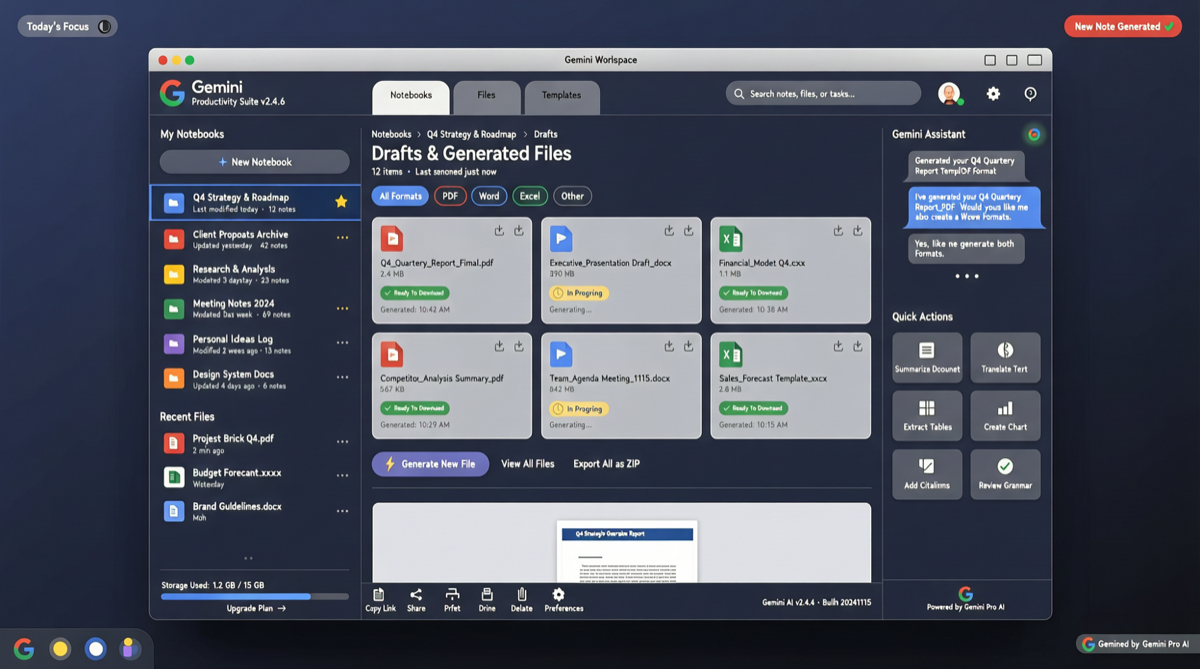
1. Notebooks: Project Memory System
This is the most underestimated update.
Previously, every Gemini conversation was “amnesiac.” You explained your project context, and next time you had to start from scratch.
Notebooks changed that:
- Cross-conversation context persistence: Your client info, project requirements, tech stack config — all stored in the Notebook
- Multi-Notebook management: Different projects use different Notebooks, no interference
- Shared collaboration: Team members can share Notebooks; new hires import project context directly
This is essentially a structured long-term memory layer, turning Gemini from “the intern you have to re-brief every time” into “the veteran who knows your project history.”
2. File Generation: From Copy-Paste to Direct Download
Gemini can now directly generate and download files in these formats:
| Format | Use Case |
|---|---|
| Reports, contracts, invoices | |
| Word (.docx) | Documents, proposals, resumes |
| Excel (.xlsx) | Data analysis, budgets, schedules |
| Google Docs | Collaborative documents |
| CSV | Data exports |
| LaTeX | Academic papers, technical documents |
| Markdown | Tech blogs, READMEs |
The key: no more copy-pasting into a local editor and saving. You say “generate a Q1 sales report PDF” in the chat, and it hands you a downloadable file.
3. Native Mac App
Google released a native macOS desktop app for Gemini.
This means:
- No need to open a browser to use it
- System-level shortcuts and notifications
- Deep integration with the macOS file system
- Direct drag-and-drop file analysis
4. NotebookLM Integration
NotebookLM can now generate research summaries, turning your document collections into structured knowledge graphs.
Why This Update Is “Bigger Than It Looks”
One tech blogger nailed it:
“The real story isn’t ‘six new features.’ The real story is Google turning Gemini into infrastructure.”
Look at the pattern:
- Notebooks give it project memory
- NotebookLM gives it research capability
- File generation gives it an output pipeline
- Mac App gives it system-level presence
This is no longer a chatbot you open, ask a question, and close. It is an AI work layer resident in your working environment, understanding your projects, directly producing deliverables.
Competitive Comparison
| Feature | Gemini | Claude | GPT/Copilot |
|---|---|---|---|
| Project memory (Notebooks) | ✅ Native | Projects (newer) | Custom GPTs |
| File generation (multi-format) | ✅ PDF/Word/Excel/LaTeX | ✅ Limited | ✅ PDF/Word |
| Native Mac App | ✅ | ❌ Web only | ❌ Web only / VS Code |
| Workspace integration | ✅ Deep | ❌ Limited | ✅ Microsoft 365 |
Gemini’s strategy is clear: leverage the Google Workspace ecosystem advantage to build the most “seamless” AI productivity experience.
Action Recommendations
- Heavy Google Workspace users: This update delivers the most value for you; Gemini is now deeply integrated with Docs/Sheets/Slides
- Independent developers / freelancers: Notebooks’ multi-project management can help you maintain independent context for each client
- Academic researchers: LaTeX file generation + NotebookLM research summaries = massive paper writing efficiency boost
- Mac users: The native app experience is clearly superior to the web version; download and try it
Forward Look
Signals suggest Google may release Gemini 3.5 or a Gemini 3.2 series at I/O around May 20. This application-layer update is likely laying the groundwork for new model capabilities.